One click to the city
English and Balkan side by side with live counts, the queue and slots, and a Play button for each. The tray menu starts either server.
Pick the English or Balkan server and press Play. Your account sits in the same window, Windows tells you when someone messages you while you are tabbed out, and there is a Zombiez arcade built in.
The launcher is for Windows PCs
Send yourself the link and download it on your PC. Everything on this page works on your phone, so have a look around first.
It does not replace FiveM. It gets you into the city faster and keeps everything around the game in one place.
English and Balkan side by side, with live player counts, the queue and a Play button for each.
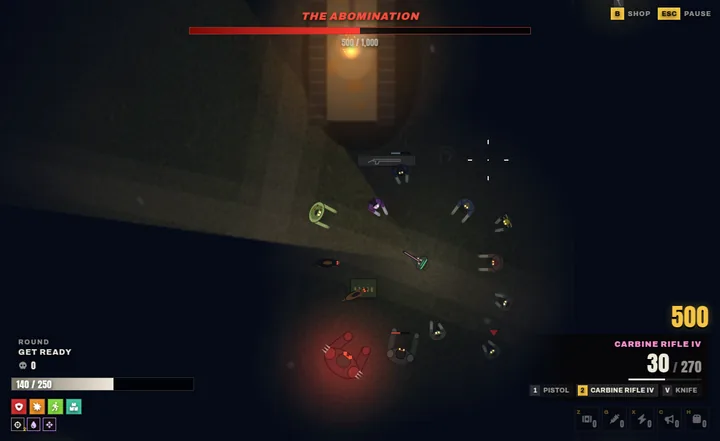
Top-down rounds on the Crash Site, solo and offline. A 3D view is in beta.
A Windows notification when someone texts, calls or messages you while you are tabbed out.
Characters, money, vehicles, tickets, appeals and your public profile, and now you can edit them here.
Your Discord profile shows the server you are on, its player count and how long you have played.
New versions download in the background and install the next time you open it. Never mid-game.
Every screen in both languages, for players on RoleplayProject Balkan.
Version 0.8.0, 5.5 MB. Installed in about a minute.
Edit your account without leaving the launcher, a ping when someone messages you while you are tabbed out, and Zombiez on your PC.
A top-down take on the in-game Zombiez mode, on the Crash Site, right inside the launcher. Play it while you wait for a friend, or when you have ten minutes and no scene.
Single player and offline. Arcade levels, Bones and bests stay on your PC and never count towards your in-game Zombiez profile, rank or leaderboards.
When someone sends you a private message, a text or a group message, calls you, or staff message you or reply to your report, the launcher shows a Windows notification with its own short ping. Click it to go straight back to the game.
Message text only shows if you turn previews on. Otherwise a notification just says who it is from.
Characters, money, vehicles, properties, inventory, messages, tickets, appeals and your public profile all live in the launcher, and 0.5.0 lets you change them there too. Password, two-step sign-in, payments and staff tools still open on the control panel, and each screen says why.
Characters, hours played, Project Points, RPP+ and anything that needs your attention, as soon as you sign in.
Where each one is, its fuel and condition, insurance and finance, across all your characters.
Accounts, cards, transactions, fines, bills, investments, credit and insurance for each character.
New in 0.5.0 Tagline, bio, pronouns, signature and Spotify song; avatar, banner and accent colour; a custom profile address and which badges to pin.
New in 0.5.0 Chat box size and colours, name tags, who can send you private messages, notification and phone size, saved to your account for the next time you join.
Open a ticket in any category and reply to staff. Paste a screenshot with Ctrl+V, and attach your FiveM logs after seeing exactly what will be sent.
Download, run, sign in, press Play. Version 0.8.0 for Windows 10 and 11.
The launcher is for Windows PCs
Send yourself the link and download it on your PC. Everything on this page works on your phone, so have a look around first.
The basics from earlier versions, still there in this one.
English and Balkan side by side with live counts, the queue and slots, and a Play button for each. The tray menu starts either server.
Shows whether you are in the launcher, joining or playing, on which server, its player count and your time played. Your character only shows if you turn that on.
The whole launcher is in Bosnian (Latin script) for RoleplayProject Balkan. Switch on the first screen or in Settings.
FiveM will not connect? It tests every server and control panel from your PC and shows where it fails.
Checks when it starts and every 30 minutes, downloads in the background and installs next time you open it, or straight away with Restart to update. Never while FiveM is running.
Patch notes, the wiki and the rules, the market and leaderboards, and the events calendar with Going and Interested.
Direct messages, group chats, friend requests and friend codes, with the staff inbox alongside.
Every screen keeps its last copy, so your characters and the news stay readable when you are offline.
Every release is scanned and signed before it goes up. These are the results for this exact file, and how to check it yourself.
No threats found
Run on our server for every release; if it finds anything, the release stops and nothing is published. One scanner is a good sign, not a guarantee, so check VirusTotal and the fingerprint too.
1 of 64 engines flagged it
Read the report to see which engines flagged it and why. New installers without a code-signing certificate sometimes get a few detections from smaller engines.
8176a3d77dd3ebcebe3231044a9fbc3623f4035c86f32af4f31dfa81c7fd77e6Check that the file you downloaded is this exact one. In PowerShell, in your Downloads folder, run the command below; the Hash it prints must match.
Get-FileHash .\RPP-Launcher-Setup.exeRPP-Launcher-Setup.exe is the name the Download button saves. From the direct link to version 0.8.0, the file is called RPP-Launcher_0.8.0_x64-setup.exe. Size: 5,819,209 bytes.
Checked by the launcher
Every release is signed with our private Ed25519 key (minisign). The launcher's updater checks that signature before it installs anything and refuses an update that does not match. The installer here carries the same signature, so you can check it too.
With minisign, decode the signature file (it is base64) and check the installer against our public key:
base64 -d RPP-Launcher_0.8.0_x64-setup.exe.sig > launcher.minisig
minisign -Vm RPP-Launcher-Setup.exe -x launcher.minisig -P RWTqK/QVjGg2vJMjhGkyVuJbKrnoSTBB44EMmtN8uRG6QdflYAkMIXC2
On Windows, decode it with certutil -decode RPP-Launcher_0.8.0_x64-setup.exe.sig launcher.minisig. "Signature and comment signature verified" means the file is ours and unchanged.
The installer is not signed with a Windows code-signing certificate yet, and SmartScreen warns about new programs it has not seen often. Choose More info, then Run anyway. The checks above are how you can be sure first.
While FiveM runs, a light anti-cheat compares running program names and window titles with a list of known cheat tools. It does not read your files, your screen or FiveM's memory. The Software Policy has the details.
Published by Phytoventures Ltd. Your sign-in token is kept in Windows Credential Manager, never in a plain file, and the launcher only talks to our own servers, over HTTPS.
Four steps, about a minute.
Press Download for Windows. You get one installer of about 5.5 MB.
Open the file. It installs for your Windows user only, so it does not ask for administrator rights. If Microsoft Edge WebView2 is missing, it is fetched for you.
SmartScreen may say it protected your PC, because the launcher is new and not yet code-signed. Choose More info, then Run anyway. Want to be sure first? Check the file.
Sign in with your control panel account (Balkan players use their Balkan account), pick a server and press Play. FiveM needs to be installed already.
Yes. The launcher is free, and so is playing on Roleplay Project. RPP+ is an optional subscription that you manage on the control panel.
No. You can still connect from FiveM directly. The launcher puts the servers, your account, support and notifications in one place.
SmartScreen warns about programs it has not seen often and about installers without a paid code-signing certificate, which ours does not have yet. Choose More info, then Run anyway. If you want to check the file first, compare its SHA-256 with the one on this page.
A Windows 10 or 11 PC (64-bit) with GTA V and FiveM installed, and an account on the control panel. Zombiez arcade works without an account.
Yes, a light one. While FiveM is running it compares the names of running programs and window titles against a fixed list of known cheat tools. It does not read your files, your screen or FiveM's memory. If something matches, it sends us what matched and a hashed device ID. The Software Policy explains exactly what it checks and sends.
No. Your password is only sent to our control panel over HTTPS. The launcher keeps a sign-in token in Windows Credential Manager, and it expires after 30 days without use.
Only if you want them to. By default a notification just says who it is from; turn on previews to see the text. You choose when they appear and which kinds you get, and there is Do not disturb and quiet hours.
No. The arcade is single player and offline. Arcade levels, Bones and bests stay on your PC and never touch your in-game Zombiez profile, rank or leaderboards.
The launcher checks for a new version when it starts and every 30 minutes, downloads it in the background and installs it the next time you open it. Updates must carry our signature, and the launcher refuses any that do not. Security releases are installed before you can play.
FiveM itself only runs on Windows, so the launcher is Windows-only.
Something not working? Tell us on the bug portal or ask in Discord, with your launcher version from Settings.
The launcher is for Windows PCs
Send yourself the link and download it on your PC. Everything on this page works on your phone, so have a look around first.